
You just want to know where your kid is. That’s it. So why is choosing between these two apps so confusing?
Life360 and Verizon Smart Family (now called Verizon Family) both promise to keep your family safe. Both track location. Both send alerts. But they work in very different ways — and the wrong choice can waste your money and your time.
This guide cuts through the noise. We’ll look at what each app does well, where each one falls short, and who should pick which one. No fluff. Just the facts you need.
What Is Life360?
Life360 is a family safety app. You download it on your phone, invite your family, and you can all see each other on a map. It works on iPhone and Android. It works on any phone carrier.
You get:
- Real-time location for every family member
- Alerts when someone arrives or leaves a place (like school or home)
- Driving reports for teen drivers
- Crash detection (on paid plans)
- Location history
Life360 is used by over 66 million people worldwide. It’s one of the most popular family tracking apps ever made.
What Is Verizon Smart Family (Verizon Family)?
Verizon Smart Family is a carrier add-on. It’s not a standalone app. It’s a paid feature you add to your Verizon phone plan.
You get:
- Real-time location for family members on your Verizon plan
- Geofence alerts (arrive/leave alerts for places)
- Content filters and website blocks
- App usage controls
- Screen time limits
- Driving safety reports
The big catch: every phone must be on Verizon. If your kid has a T-Mobile or AT&T phone, Verizon Smart Family won’t work on their device.
Life360 vs Verizon Smart Family: Feature Comparison
| Feature | Life360 (Free) | Life360 (Paid) | Verizon Smart Family |
|---|---|---|---|
| Real-time location | ✅ | ✅ | ✅ |
| Location history | Limited | Up to 30 days | Up to 30 days |
| Geofence alerts | ✅ | ✅ | ✅ |
| Driving reports | Basic | Full | ✅ |
| Crash detection | ❌ | ✅ | ❌ |
| App controls | ❌ | ❌ | ✅ |
| Website filters | ❌ | ❌ | ✅ |
| Screen time limits | ❌ | ❌ | ✅ |
| Works on any carrier | ✅ | ✅ | ❌ (Verizon only) |
| Works on any device | ✅ | ✅ | ❌ (must be on Verizon plan) |
| Number of members | Up to 6 | Up to 6 | Up to 10 lines |
Pricing: What Will You Actually Pay?
Life360 Pricing
Life360 has a free tier. But it’s limited. Most parents end up upgrading.
| Plan | Price | What You Get |
|---|---|---|
| Free | $0/month | Basic location, limited history |
| Gold | ~$9.99/month | Better history, driving reports, SOS alerts |
| Platinum | ~$19.99/month | Crash detection, ID theft protection, full features |
One plan covers your whole family (up to 6 members). So if you have 4 kids, you still pay one price.
Verizon Smart Family Pricing
| Plan | Price | What You Get |
|---|---|---|
| Smart Family Companion | ~$5/month per line | Location, alerts |
| Smart Family Premium | ~$10/month | Location + parental controls, content filters |
Here’s the key thing most people miss: you pay per line. If you have 3 kids on Verizon, you pay $5–$10 per child per month. That adds up fast.
For a family of 4 on Verizon Smart Family Premium: $30–$40/month just for the add-on — on top of your already expensive Verizon bill.
Life360 Platinum for the same family: $19.99/month total.
Location Accuracy: Which One Tracks Better?
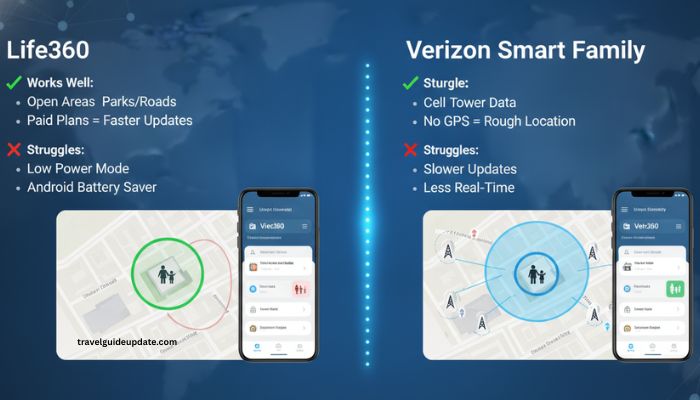
Both apps use GPS, Wi-Fi, and cell towers to find your phone. Neither is perfect.
Life360 Location Accuracy
Life360 is solid in open areas. Parks, roads, suburbs — it works well. The update rate on paid plans is faster than the free tier.
Where it struggles:
- Inside malls or large buildings (GPS signal is weak there)
- When your child’s phone is in Low Power Mode
- When Android battery settings block background apps
Verizon Smart Family Location Accuracy
Verizon Smart Family gets location from the phone’s GPS and from the cell network. This can be an advantage. Even if GPS is weak, cell towers can still give a rough location.
Where it struggles:
- Same indoor GPS issues as Life360
- Location updates can be slower than Life360 on paid plans
- Less frequent real-time refresh
Bottom line: Life360 on a paid plan updates location more often. Verizon Smart Family can locate a phone even without strong GPS, thanks to cell tower data. Neither is perfect.
Driving Safety: Who Keeps Teen Drivers Safer?
This is where the two apps split the most.
Life360 Driving Features
Life360 was built with teen drivers in mind. You get:
- Speed alerts — get a text if your teen goes over a set speed
- Phone use while driving — Life360 can detect if a teen uses their phone at speed
- Trip reports — see the full route, top speed, and hard braking
- Crash detection — on Platinum, the app can detect a crash and alert you (and emergency services)
Crash detection is a big deal. No other mainstream family tracker offers this at scale like Life360 does.
Verizon Smart Family Driving Features
Verizon Smart Family also has driving reports. You can see:
- Where your teen drove
- How fast they went
- Hard braking or acceleration events
But Verizon Smart Family does not have crash detection. If your teen gets in an accident, the app won’t alert you. You’d still need a phone call.
Winner for driving safety: Life360 — especially if crash detection matters to you.
Parental Controls: Who Gives Parents More Power?
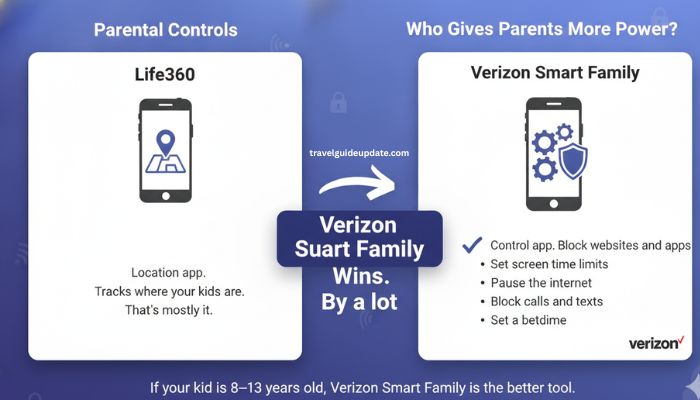
This is where Verizon Smart Family wins. By a lot.
Life360 is a location app. It tells you where your kids are. That’s mostly it.
Verizon Smart Family is a control app. It lets you manage what your kids can do on their phones.
What Verizon Smart Family Lets You Do That Life360 Can’t:
- Block websites and apps — set content filters by age group
- Set screen time limits — schedule when the phone can be used
- Pause the internet — cut off Wi-Fi and data on your child’s phone with one tap
- Block calls and texts — restrict who your child can contact
- Set a bedtime — the phone goes quiet automatically at night
If your kid is 8–13 years old and you want control over what they see and do on their phone, Verizon Smart Family is the better tool.
Life360 doesn’t do any of this.
Privacy: What Do These Apps Do With Your Data?
Both apps collect location data. That’s obvious — it’s what they do. But there’s more to know.
Life360 and Privacy
Life360 has faced criticism in the past for selling anonymized location data to third-party data brokers. The company said it was anonymized, but privacy groups pushed back hard.
In 2022, Life360 announced it would stop selling location data to data brokers. This was a major policy shift.
Still, Life360 does use location data internally for app improvement and may share some data with partners. Read the privacy policy if this matters to you.
Verizon Smart Family and Privacy
Verizon is a phone carrier. They already know a lot about you. Verizon Smart Family adds family tracking data on top of that.
Verizon uses your data to improve its services and may share some with partners, as outlined in its privacy policy. As a large US carrier, Verizon is subject to strict data laws.
Neither app is fully private. If privacy is your top concern, research both current privacy policies before signing up.
Setup: Which One Is Easier to Get Started?
Life360 Setup
- Download the app (free on iOS and Android)
- Create an account
- Create a “Circle” (your family group)
- Send invites to family members
- Each person accepts and allows location sharing
Most families are up and running in under 10 minutes. The hard part is making sure everyone allows background location. On Android especially, battery optimization can kill tracking. You’ll need to go into phone settings and whitelist the app.
Verizon Smart Family Setup
- Log into your Verizon account online or in the My Verizon app
- Add Smart Family to your plan (costs extra)
- Set up each line as either a parent or dependent
- Download the Smart Family app on the parent’s phone
- Configure controls for each dependent line
It’s a bit more involved. And if your family members aren’t all on Verizon, stop here — it won’t work for non-Verizon phones.
The Hidden Costs Most Parents Miss
Life360 Hidden Costs
- The free plan feels useful at first, but you’ll hit walls fast
- Some safety features (like crash detection) are only in the most expensive tier
- If your family grows beyond 6 people, you may need a different plan
Verizon Smart Family Hidden Costs
- You pay per line, not per family
- A family of 4 kids could cost $20–$40/month just for this add-on
- This is on top of your Verizon plan, which is already one of the pricier carriers
- If you leave Verizon, you lose access to all your Smart Family data and controls
When to Pick Life360?
Choose Life360 if:
- Your family has a mix of iPhones, Androids, or different carriers
- You care most about knowing where your kids are at all times
- You have a teen driver and want crash detection
- You want a lower flat monthly cost for the whole family
- You don’t need deep parental controls — just location
When to Pick Verizon Smart Family?
Choose Verizon Smart Family if:
- Every family member is on Verizon
- You have younger kids (8–13) who need content filters and screen time limits
- You want one app to manage location AND phone controls
- You’re already paying for Verizon and want to bundle
- You’re okay paying more per line for more control
What If You Need Both?
Here’s a truth most comparison articles skip: some families use both.
A parent might use Life360 for location tracking across all devices, and also use Verizon Smart Family for content filters on a young child’s Verizon phone.
Is it worth paying for both? Only if the parental controls in Verizon Smart Family are something you truly need and can’t replicate elsewhere.
3 Things to Fix Before You Blame the App
If location looks wrong or alerts aren’t working, fix these first:
- Check background location settings. Both apps need “Always Allow” location access, not just “While Using.”
- Disable battery optimization on Android. Go to Settings > Battery > find the app > set to “Unrestricted.”
- Turn off Low Power Mode on iPhone. It limits background app activity, which kills location updates.
90% of tracking problems come from these three things. Fix them and most issues go away.
Frequently Asked Questions
Does Life360 work without Verizon?
Yes. Life360 works on any phone carrier — Verizon, AT&T, T-Mobile, or any other. Your carrier doesn’t matter at all.
Can Verizon Smart Family track a phone on a different carrier?
No. Verizon Smart Family only works on phones that are on an active Verizon plan. It won’t work on AT&T, T-Mobile, or prepaid phones.
Is Life360 free?
Life360 has a free plan, but it’s limited. You get basic location sharing. For driving safety, crash detection, and full location history, you need a paid plan.
How much does Verizon Smart Family cost per month?
It starts at around $5 per month per line for the basic plan, and around $10 per month per line for the premium plan with parental controls. You pay for each phone you want to monitor, not a flat family rate.
Which app is better for teen drivers?
Life360 is better for teen drivers. It has crash detection, phone-while-driving alerts, speed alerts, and full trip reports. Verizon Smart Family has driving reports but no crash detection.
Can my kid turn off Life360?
Yes, in theory. If your child has access to their phone settings, they can turn off location sharing or uninstall the app. Life360 will alert you if someone leaves the circle or turns off their location. Verizon Smart Family is harder to bypass because it’s tied to the carrier account.
Does Life360 drain the battery?
It can use more battery than average because it tracks location in the background. Using a paid plan with faster refresh rates uses slightly more power. The trade-off is worth it for most parents.
Can I use Life360 and Verizon Smart Family at the same time?
Yes. They don’t conflict with each other. Some parents use Life360 for location and Verizon Smart Family for content controls on younger kids.
Which app is better for kids under 13?
Verizon Smart Family is better for younger kids. The parental controls — website filters, screen time limits, app blocks — are made for that age group. Life360 doesn’t have these controls.
Does Verizon Smart Family have crash detection?
No. Verizon Smart Family does not have crash detection. If this is important to you, Life360 Platinum is the better choice.
Final Verdict
Choosing between Life360 and Verizon Smart Family comes down to your family’s needs. If you want accurate location tracking, cross-carrier compatibility, and advanced driving safety features like crash detection, Life360 is the stronger all-around choice. If your entire family uses Verizon and you need robust parental controls such as screen time limits, content filtering, and app management, Verizon Smart Family is a great fit. Both apps are reliable, but selecting the one that matches your devices, budget, and parenting style will give you the best value and peace of mind.